Last Updated June 26, 2026
We’re often asked about the differences between GW Apps and AppSheet, and which product will offer the best solution.
Both products have unique underlying architectures that make them more suitable for building different types of applications. In this paper we’ll look at the relative strengths of both products, as well as the types of applications each is a better fit for.
Architecture - Form Builder vs Data Modeling
GW Apps
GW Apps drag-and-drop form builder offers a visual way for users to build their apps. With multiple layout options and lots of customizability, it enables users to easily build and organize highly functional forms to fit their needs. Forms can have up to 4 columns of fields, and will automatically reformat to fit different screen sizes. GW Apps can also create forms automatically by uploading existing data from a spreadsheet. This initial form can then be easily reformatted and extended to complete the design.

AppSheet
AppSheet takes a data modeling approach that allows you to easily create a front-end apps to work with existing data sources; however, you do have the option of using a native AppSheet database instead. The form is automatically generated from the data source as a single column of fields in the same order as the underlying table. There are very few options to control how the form is laid out, and no easy way to add non-field elements to your form such as images, dividing lines, labels or sections. AppSheet does offer strong mobility features, making it more suited for users in the field rather than office employees. It is a strong candidate for simple apps that involve onsite data entry like inventory mgmt or inspection.
Workflow and Automated Actions
GW Apps
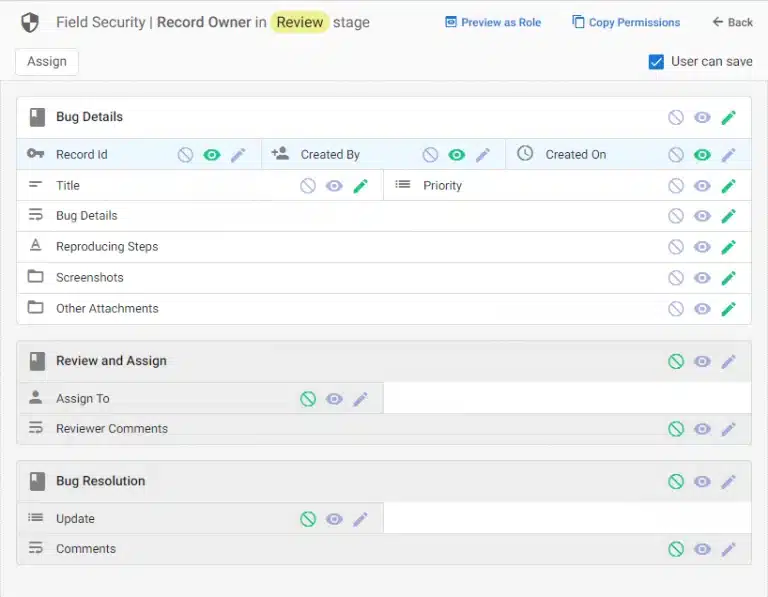
This is GW Apps’ strength. Its Workflow Builder allows you to easily model complex business processes (workflows), with features like multiple levels of approval, routing, automatic and scheduled triggers, conditional actions, granular security, and more. User permissions are controlled by custom roles, and each application has its own set of roles. Permissions can be configured all the way down to individual fields at a specific step in the process (i.e., workflow stages), as seen in the image below. GW Apps also allows you to create Shared Global Roles – roles that can be pre-populated with users and imported into any application.
AppSheet
With AppSheet, workflow is created and designed through the use of bots and automation, which combined can create the usual actions of a workflow. There are only two predefined roles in AppSheet (Admin and User), and permissions for each apply to a whole type of data (e.g., all sales records or all inspection report records). While it’s possible to create custom roles and to define access at a row/stage level, to do so requires a creative combination of several advanced features, including the use of expressions. These would get very, very complex to match what’s possible via the simple GW Apps form security interface.
Ease of Use
GW Apps
GW Apps is designed to be both easy to use and simple to learn, while simultaneously providing features that enable users to build enterprise grade applications. This is achieved through the use of drag, drop, and configure style builders. Even the most complex features in GW Apps have no code, no expression language to learn, nothing but wizard style, pick from list configurations.
Unlike AppSheet, there is no separate data-modeller in GW Apps. As you build a form the data model is automatically created for you, resulting in fewer steps to creating an application and only one interface for creating forms.
AppSheet
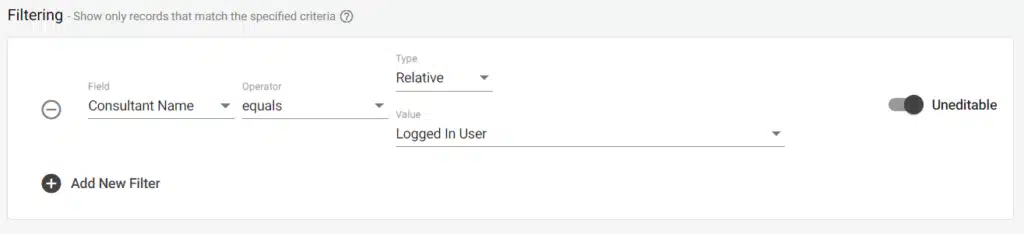
As mentioned earlier, AppSheet provides two built-in roles, Admin and User, and these cannot be renamed, reconfigured, or added to. To model anything more granular — custom roles, or giving users edit rights to only specific records (rows) — you build it yourself using a separate users table or domain groups (such as Google Groups), combined with security filters and expressions. Field-level security is available on paid plans, but without dynamic, named roles and per-stage field visibility it doesn’t offer the same flexibility. In short, while AppSheet can achieve much of what GW Apps can, app designers must have a comprehensive understanding of both AppSheet’s expression language and how to combine multiple features in tandem to build functionality that is readily available and more easily configured in GW Apps.

AI Capabilities
GW Apps
GW Apps builds AI directly into the form and workflow builder as configurable, no-code actions — there’s no separate AI module to learn. When creating a form, the “Generate Fields using AI” option can produce a starting set of fields from the form’s name and an optional context prompt; a form named “Purchase Requests,” for example, might generate Request Title, Request Date, Requester, Quantity, and Estimated Unit Price, which you can review, regenerate, accept, and then edit as usual. AI also assists with multilingual apps: AI Field Translations translates field titles and help text into other languages, while AI Data Translation translates the record-level content a user enters — so a survey response submitted in Spanish can be automatically translated to English in a separate field.
Beyond data entry, GW Apps offers AI actions that operate on your records as part of a workflow. AI Categorization analyzes the content of one field and sets another accordingly — for instance, reading a description field and setting a sentiment dropdown to “Unhappy” or “Satisfied.” AI Attachment Extraction parses uploaded files and populates fields with the results, such as pulling the vendor, date, amount, and line items off a receipt attached to an expense report. And for organizations with their own AI infrastructure, GW Apps supports the Model Context Protocol (MCP) and Agent-to-Agent (A2A) standards, allowing apps to connect with external enterprise agents such as Gemini Enterprise. Crucially, GW Apps is not locked to a single AI provider — when configuring these AI agent actions, you can choose which model to use, including Anthropic’s Claude, OpenAI’s ChatGPT, and Google’s Gemini.
AppSheet
AppSheet’s AI capabilities are powered by Google’s Gemini. Gemini for App Creation lets you generate a working app by describing a business process in plain language, returning a suggested set of tables, columns, views, and actions that you can then refine — a fast way to stand up a first draft. Within automations, AppSheet’s AI Tasks can extract, categorize, and summarize information from photos, PDFs, and unstructured text, and the platform retains its established machine learning and optical character recognition (OCR) features for intelligent document processing. These are capable tools, though the AI Tasks used inside automations require the top-tier Enterprise Plus plan, whereas Gemini for App Creation is available across the paid plans.
Pricing
GW Apps
GW Apps offers 3 plans for businesses: The SMB value plan for teams of up to 100 users ($350/mo), and two additional plans targeted at Mid Market and Large enterprises, with an average price of $2/user/mo. There is also a starter plan for $99/mo. The free trial plan has no feature limitations, enabling new users to try the platform and build a test application and fully validate its effectiveness. Unlike AppSheet, all GW Apps plans give users access to all of the features of the platform.
AppSheet
AppSheet pricing is based on the number of end-users for your applications. Plans start at $5/user/mo for the Starter edition, while most business apps will require at least the Core plan at $10/user/mo. The platform’s most advanced capabilities — enterprise data sources, advanced governance, and machine learning — sit at the top Enterprise Plus tier ($20/user/mo). Note that AppSheet Core is bundled at no extra cost with many paid Google Workspace editions, which can make AppSheet effectively free for organizations already on Workspace. AppSheet’s free tier lets you prototype and test with up to 10 users, but it’s intended for personal or evaluation use — you can’t deploy an app for business use without moving to a paid plan.
Customer Support
GW Apps
Access to live human support is an important resource to help you understand and build apps on the platform. Many GW Apps users have built complex applications with minimal support, while others have needed a helping hand from the beginning. We provide live support to all our users. GW Apps continues to invest in online support content, and we welcome your call anytime you need to get answers or help with your next step.
AppSheet
AppSheet is now a Google product, giving you access to a large set of resources. But larger does not always mean better. Many large organizations make it difficult to reach a live person, and want the customer to leverage all online resources or community support before allowing you to get live support and help with your application.
Other Considerations
Data and Platform Security
Both GW Apps and AppSheet are built on the Google Cloud Platform and leverage the strong data security features that it provides: uptime, data access, stability and compliance.
Reports, View and Dashboards
Both products offer a variety of views and reports to help you and your team view and analyze data, and initiate actions. AppSheet has more view styles available, while GW Apps has a KanBan view, more detailed view display options, and a more feature-rich PDF builder.
Integration with 3rd party apps
Both platforms give you capabilities to integrate with 3rd party apps via webhooks and APIs. AppSheet has more specific out of the box integrations and capabilities (OCR and machine learning, for example).
Feature Comparison Summary

In Conclusion
These differences in approach are often the deciding factor in determining which product fits your specific business goals.
GW Apps’ real strength lies in its ability to create audit-ready applications for secure business transactions where it is vital only specific people can see or edit specific data, at specific stages in the process life-cycle. It also offers far greater control over how data is laid out in forms, and builds AI directly into those forms and workflows — with the flexibility to choose your AI provider rather than being tied to one.
AppSheet is a very quick way to build web apps if you already have populated Excel or Google Sheets, or a SQL database to serve as the data source. It also has powerful features for mobile applications like geolocation and barcode scanning, and brings Google’s Gemini AI into app creation and automation.
If you have any questions or would like to schedule a demo/meeting, you can reach out to us at sales@gwapps.com or request your meeting here: Request a Meeting. You can also use this link to start your free trial: 30-day GW Apps Free Trial.
Recent Posts
Ready to Get Started?
Start your free 30-day trial and see how easy it is to connect your employees to the services that they need.
 English
 Español de México
 Italiano