

What's New...
We’re excited to share several powerful updates designed to make your workflows more dynamic, intelligent, and user-friendly. These enhancements were shaped directly by your feedback and built to give you more control over your data handling, audit compliance, and integrations.
Here’s what’s new:
• Record-Level Comment Section
You now have a dedicated comments section linked to each individual record. This allows your team to maintain a clear dialogue and provide context directly within the record’s workspace. These comments are captured as part of the record, ensuring that important notes remain a permanent part of the documentation and are never lost.
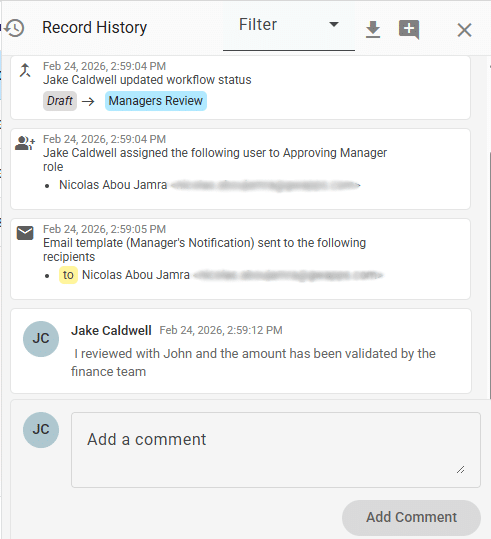
• Exportable & Filterable Record History
Building on our transparency features, you can now download the Record History for individual records. This makes it easy to capture a complete change log for a specific record, including:
- Field Updates
- Workflow Actions
- Automated Emails
- User Comments
You can still use the existing event filters to narrow what you see on-screen, and you can download the record’s history to CSV for sharing or recordkeeping. This is especially helpful for SOC audits and internal compliance reviews.

• Streamlined BigQuery Service Account Management
To simplify your security protocols, we’ve updated how service accounts are managed. You can now replace existing service account keys directly instead of having to create new Dataset keys every 6 months. This eliminates the need to reconfigure every table on your forms during rotations, saving significant administrative time and ensuring uninterrupted data syncs.
• Internal Field Code & Title Export
Mapping your data to BigQuery is now much simpler. You can now download a reference list of your field titles along with their corresponding internal field codes. This ensures that when you’re working in BigQuery, you can quickly and accurately map column headers to the correct form data without manual guesswork.

• Additional Recent Updates
In addition to the updates included in the latest release, the following are other notable enhancements introduced recently:
- New Email Sending Options: You can now choose between sending an individual email to each recipient, or a shared email where all recipient addresses are visible to everyone on the list.
- App Publishing Approval: Ensure apps are reviewed before going live. Assign authorized reviewers to approve or reject publishing requests for greater oversight and control.
- AI field suggestions: When creating a new form, you can now have AI suggest relevant fields from natural language input.
- AI translations: Translate form content into multiple languages using AI.
- DocuSign integration: Send documents for signature and track completion within your workflows.
- New address lookup field: Quickly populate address fields using verified location data.
- New HTTP lookup field: Pull external data into forms using HTTP-based lookups.
- New Radar Chart widget: Visualize and compare multiple data points across categories in a single chart.
If you have any questions or would like to schedule a demo/meeting, you can reach out to us at sales@gwapps.com or request your meeting here: Request a Meeting. You can also use this link to start your free trial: 30-day GW Apps Free Trial.
Recent Posts
Ready to Get Started?
Start your free 30-day trial and see how easy it is to connect your employees to the services that they need.
 English
 Español de México
 Italiano